




Contents 11 sections
- Why SPF, DKIM and DMARC matter in 2026
- SPF: the guest list
- DKIM: the tamper-proof seal
- DMARC: the rulebook
- The three records side by side
- Setup steps in your DNS panel
- How to check it worked
- Microsoft 365, sending tools and tracking domains
- After DNS: warm up and choose who to email
- Common SPF, DKIM and DMARC mistakes
- Frequently asked questions
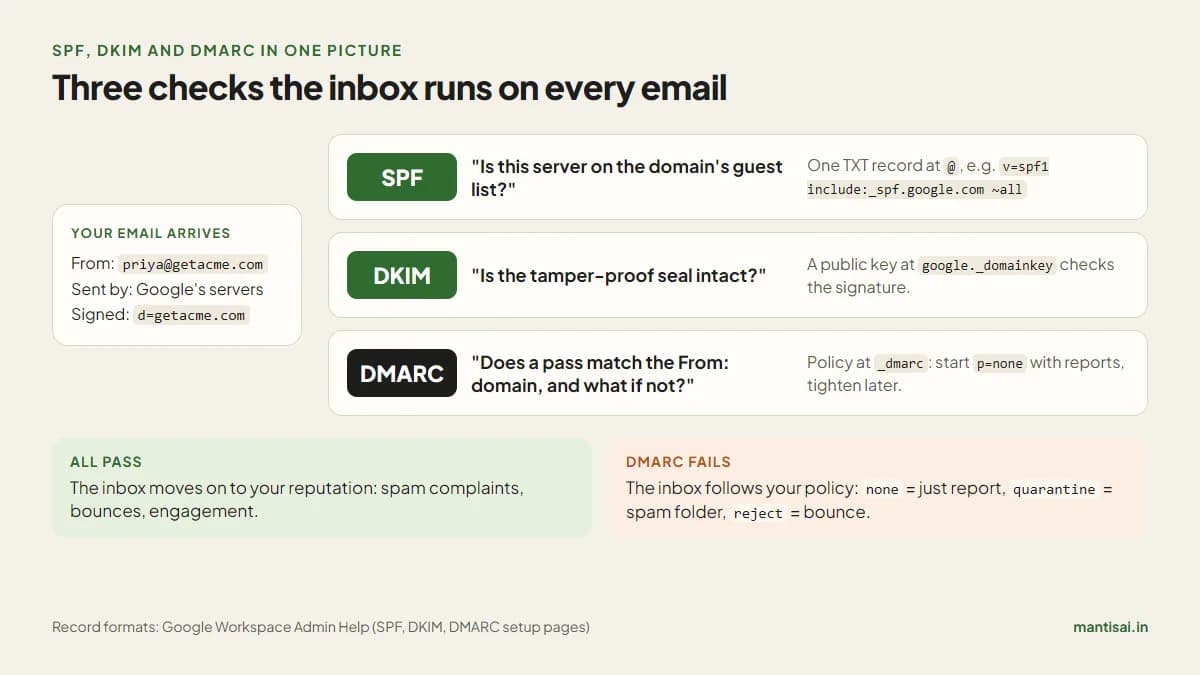
SPF, DKIM and DMARC are three short text records you add to your domain so inboxes can tell your real emails from fakes.
SPF lists who may send, DKIM seals each message, and DMARC says what to do when a check fails.
Why SPF, DKIM and DMARC matter in 2026
Since February 2024 Gmail and Yahoo require every sender to pass SPF or DKIM and to keep spam complaints under 0.3%. Senders of about 5,000 messages a day or more need all three records.
Outlook.com joined in 2025. Since 5 May 2025 it rejects mail from domains sending more than 5,000 a day that fail these checks, with error 550 5.7.515.
The three providers are compared in Google, Yahoo and Outlook bulk sender requirements.
Below those volumes the records are still worth it. Google's sender guidelines recommend that you always set up SPF, DKIM and DMARC, and unauthenticated mail may be marked as spam or rejected.
SPF: the guest list
SPF is the oldest of the three records and the simplest to set up. It answers one question: which servers may send mail for your domain?
SPF (Sender Policy Framework)
A public list of the servers allowed to send email for your domain. When mail arrives, the inbox checks whether the sending server is on your list.
Think of a building guard with a guest list. If your mail comes from Google's servers and Google is on the list, it gets in.
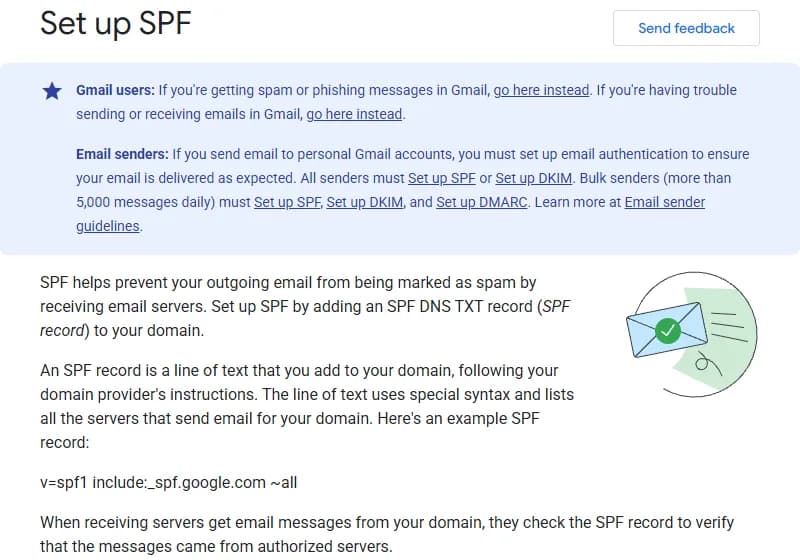
If you use only Google Workspace, Google gives you the whole record: v=spf1 include:_spf.google.com ~all. Microsoft 365's version is v=spf1 include:spf.protection.outlook.com -all.
Two rules trip people up. A domain may have only one SPF record, so add every sending service to the same line.
And the record may trigger no more than 10 DNS lookups, or SPF fails with a permanent error.
DKIM: the tamper-proof seal
DKIM adds an invisible digital signature to every email. The inbox reads your public key from DNS and checks the seal is unbroken, which proves the message came from your domain and wasn't altered.
In Google Workspace you generate the key yourself: Admin console, then Apps, Google Workspace, Gmail, then Authenticate email. Choose 2048-bit if your DNS host allows it, keep the prefix as google, and click Generate.
Google adds two timing rules:
- Day 0Turn Gmail on for the domain
Do not generate the DKIM key yet.
- 24–72 hoursGenerate the DKIM key
2048-bit if your DNS host allows it, prefix google. Publish it as a TXT record.
- Up to 48 hoursClick Start authentication
Wait for the published key to spread through DNS first.
Use 2048-bit keys
Gmail requires DKIM keys of at least 1024 bits for personal Gmail recipients and recommends 2048 bits where your domain provider supports it.
DMARC: the rulebook
DMARC alignment
DMARC passes only when SPF or DKIM passes for the same domain shown in the From: line. It also tells inboxes what to do when that fails, and where to send reports.
Start gently. Google says to begin with p=none, which only reports, then move to quarantine or reject over time. Yahoo strongly recommends a rua address so the reports reach you during setup.
A starter record looks like this: v=DMARC1; p=none; rua=mailto:dmarc@yourdomain.com. It goes in a TXT record at _dmarc.
| DMARC policy | What the inbox does on failure | When to use it |
|---|---|---|
| p=none | Delivers as normal, sends you a report | First weeks, while you check every sender passes |
| p=quarantine | Sends failing mail to spam | After reports show only your own services sending |
| p=reject | Refuses failing mail | When you are sure nothing legitimate fails |
| Verdict: Start at p=none with reports; tighten only after the reports are clean. | ||
The three records side by side
Every sending domain gets its own set. If you run 10 sending domains for cold email, as in our cold email infrastructure setup, you publish 30 records in total.
That is 30 records for about ₹1,333 a month in domains; the full bill is in cold email infrastructure cost.
| Record | Name / host | Value (Google Workspace example) | Where the value comes from |
|---|---|---|---|
| SPF | @ | v=spf1 include:_spf.google.com ~all | Google's SPF help page |
| DKIM | google._domainkey | v=DKIM1; k=rsa; p=(your key) | Admin console, Authenticate email |
| DMARC | _dmarc | v=DMARC1; p=none; rua=mailto:dmarc@yourdomain.com | You write it |
| Verdict: Three TXT records per domain: two copied, one written by you. | |||
Microsoft 365 uses include:spf.protection.outlook.com for SPF; its DKIM values come from Microsoft's own admin settings.
Setup steps in your DNS panel
You don't need to be technical. Each record is one line you copy from Google or Microsoft and paste into your domain provider's DNS page, then wait a day or two.
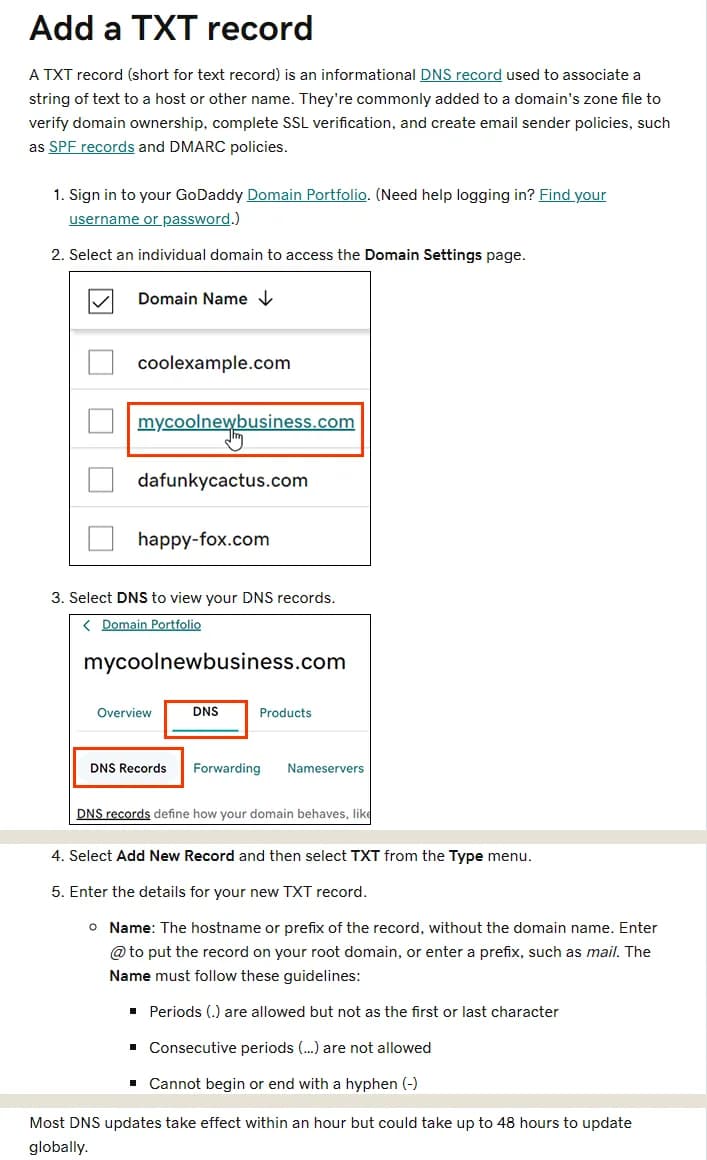
Your DNS panel is wherever you bought the domain: GoDaddy, Hostinger, Cloudflare or similar. The screens differ, but every one has an "Add record" button with Type, Name and Value fields.
GoDaddy's help page shows the flow most Indian founders will see: Domain Portfolio, pick the domain, DNS, Add New Record, then TXT.
Open the DNS page
Sign in where you bought the domain and open its DNS records.
Add SPF
Type TXT, Name @, Value from Google or Microsoft. Edit the existing SPF line if there is one.
Add DKIM
Generate it in the Admin console, then paste the name and value as a TXT record.
Add DMARC
48 hours later: Type TXT, Name _dmarc, Value v=DMARC1; p=none; rua=…
How to check it worked
Send an email from the new mailbox to a Gmail address you own, open it, and choose "Show original". Google lists SPF, DKIM and DMARC at the top with PASS or FAIL.
Google notes you can't verify DKIM by emailing yourself, so use a different address. Free online checkers can also read your records and count SPF lookups.
Once volume picks up, Google Postmaster Tools shows the spam rate and authentication results Gmail sees for your domain.
Microsoft 365, sending tools and tracking domains
On Microsoft 365 the SPF value changes to include:spf.protection.outlook.com, per Microsoft's SPF guide. Microsoft recommends -all instead of ~all because DMARC handles the failures.
Sending tools that connect to your Gmail or Outlook mailbox send through Google's or Microsoft's servers, so the same records cover them.
A tool that sends from its own servers needs its own include in your SPF line.
Click tracking uses a custom tracking domain, a CNAME record pointing to the tool.
Switch open tracking off
Rework's default advice is to turn open tracking off and keep links out of the first email. Fewer tracking pixels and redirects mean fewer reasons for a filter to doubt a new domain.
After DNS: warm up and choose who to email
Authentication gets you through the door; reputation keeps you there.
New mailboxes still need two to four weeks of warm-up, covered in our email warm-up schedule, and a sensible daily cap from how many cold emails per day.
Clean the list before the first send; clean your lead list before an AI SDR touches it covers the checks. And keep India's rules in mind: see cold email and the DPDP Act.
Then the list decides your complaint rate. Mantis Ai reads business websites for gaps worth mentioning; 67,246 of the 1,32,769 sites it has read have no analytics (Mantis index, Nov 2026).
See SEO leads in Gurgaon for a live sample.
Businesses whose websites run no analytics: 67,246 in the Mantis index, Nov 2026 (rows shown from Gurgaon)
| Business | Category | Google rating | Signal | Contact |
|---|---|---|---|---|
| Mahindra Dee Emm, SUV Showroom | Car dealer | 4.7 | No analytics, no Meta pixel | Locked |
| The Beer Café | Pub | 4.4 | No analytics, no Google Ads tag | Locked |
| Greenr Cafe | Restaurant | 4.4 | No analytics, no Meta pixel | Locked |
| DiGhent Cafe | Restaurant | 4.4 | No analytics, no Google Ads tag | Locked |
Our take
Authentication gets you through the door; reputation keeps you there. Once the three records pass, the list decides your complaint rate, so email fewer, better-matched businesses with a real reason to hear from you.
Common SPF, DKIM and DMARC mistakes
Five mistakes cause most failed checks. Each one is quick to fix once you know to look for it.
Your domain is authenticated. Now give it people worth emailing.
Describe your ideal customer. Mantis Ai finds matching businesses with a visible reason to buy, unlocks checked contacts and can send the sequence from your authenticated mailbox. Earn up to 500 free credits as you set up.
Find your first leadsFrequently asked questions
What is the difference between SPF, DKIM and DMARC?
SPF lists which servers may send for your domain. DKIM adds a signature that proves the message wasn't changed. DMARC checks that one of them passes for the domain in the From: line and tells inboxes what to do if not.
Do I need all three records?
Gmail and Yahoo require SPF or DKIM from all senders and all three from bulk senders. Google recommends all three for every domain, and they cost nothing to add.
What DMARC policy should I start with?
Start with p=none and a rua address for reports. Move to quarantine and then reject only after the reports show every legitimate sender passing.
How long do SPF and DKIM take to work?
Google says up to 48 hours for each. For DKIM, also wait 24 to 72 hours after turning on Gmail before generating the key. Add DMARC 48 hours after SPF and DKIM.
Can I have two SPF records on one domain?
No. Multiple SPF records make SPF return a permanent error. Combine all senders into one v=spf1 record with one include per service.
Do I need SPF, DKIM and DMARC for cold email?
Yes. Every sending domain used for cold email should have all three before warm-up starts. They are the minimum that Gmail, Yahoo and Outlook check before looking at your reputation.

Builds Mantis and runs Gigzman, a web design and software studio in Gurugram. Sells websites to local businesses for a living, which is where these playbooks come from.
Related reading
 OutreachWhatsApp Cold Messaging in India: Rules & Cost per Message9 min read →
 OutreachTRAI Rules for Cold Calling (2026): 140 vs 1600 and AI Calls10 min read →
 OutreachSignal-Based Selling for Indian SMBs: A Practical Playbook9 min read →
Start here: Prospecting & sales · Cold email infrastructure setup on one page · Google, Yahoo and Outlook sender requirements · Email warm-up schedule: the day-by-day calendar · How many cold emails per day can you send? · Cold email and India's DPDP Act